eSIM, travel content
Tokyo Metro Offline Prep & Japan eSIM Guide
Everything to download and set up before you head underground in Tokyo — plus how to stay connected with a Japan eSIM.
Tokyo's Metro is one of the world's busiest and most efficient subway systems, but it can also feel overwhelming for first-time visitors. Between complex interchanges, multiple exits, and occasional connectivity drops underground, a little preparation goes a long way. Before heading underground into stations like Shinjuku or Shibuya, here's what you should download and set up on your phone to make getting around Tokyo much easier.
What to Download Before You Arrive in Tokyo
Before you arrive in Japan, spend a few minutes setting up the essential apps and tools on your phone. Doing this before entering the Tokyo Metro means you'll spend less time troubleshooting and more time navigating confidently, giving you a peace of mind as you commute around the city.
Transit Cards: Suica or Pasmo
A digital Suica or Pasmo is one of the first things you should set up before using the Tokyo Metro.
- iOS Users: You can add a digital transit card directly via Apple Wallet by opening the app, tap the "+" icon, select "Transit Card," search for Suica or Pasmo, and load funds instantly using Apple Pay.
- Android Users: International Android devices generally don’t support Japanese digital transit cards. In this case, the best option would be to purchase dedicated tourist physical cards, the Welcome Suica or the Tourist Pasmo. Both tourist cards last for 28 days and require no deposit.

Navigation Apps
Your navigation app is arguably the most important download before heading underground.
Google Maps: Reliable for street-level walking directions, but less precise for subway navigation when you're completely offline.
NAVITIME: While Google Maps is great for general searches, one app that is highly recommended for Tokyo is NAVITIME because it allows you to filter transit routes by specific travel passes (like the Tokyo Metro 24-Hour Ticket or the JR Pass), optimizing journeys to prioritize specific operators and help you get your desired metro platform easily.
Translation Apps
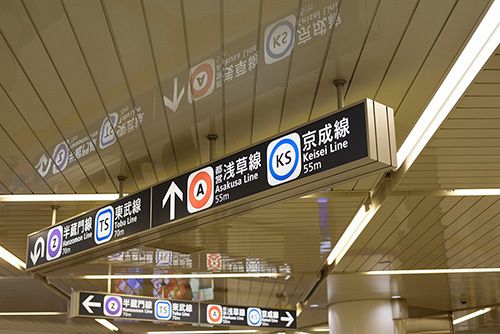
Most major stations include English signage, but station directories, ticket machines, platform notices, and service announcements may still appear only in Japanese.
Here are a few apps to help you read the world around you:
1. Google Translate : Simple but effective option: use the camera feature to instantly translate complex station exit directories, platform direction signs, and physical ticket machine screens.
2. Voice Tra : Made specially for travelers in Japan, this app helps you talk to locals by translating your voice while keeping the natural tone of the language. It supports 30+ languages.
3. DeepL : If you need to understand a complex announcement or a longer sign, DeepL is incredibly accurate and understands the context better than most other apps.
Offline Maps for the Tokyo Metro (No Signal Needed)
Given the vast extent of Tokyo's subway network, you might occasionally experience connectivity drops underground. If you temporarily lose mobile signal underground, switch to these tools that work without any signal:
- Tokyo Subway Navigation: This is the official app from Tokyo Metro. It saves the whole map to your phone so you can plan your route even without a signal.
- Mapway Subway Map: Another great offline map that’s clear and easy to read. It won’t leave you staring at a blank screen.
- The Classic PDF Map: Download the high-resolution maps from Tokyo Metro. They use simple letter-and-number codes for every station, making them super easy to follow.

Best Way to Stay Connected: Japan eSIM vs Pocket Wi-Fi
To enjoy your time in Tokyo, you'll need reliable data. While you might be tempted by public Wi-Fi, it can be a hassle with constant logins, and currently, Tokyo’s free public Wi-Fi service is under suspension (as of July 2026). Instead, consider your connectivity options:
Pocket Wi-Fi (like Ninja WiFi): These portable routers are a solid choice if you're traveling with a group and need to share data. However, they do have some downsides - you have to carry an extra device, keep it charged, and remember to return it before you head home.
The Better Alternative: eSIM. For most travelers, an eSIM is the simplest option a game-changer. It’s easy to activate, keeps you connected seamlessly, and there’s no bulky hardware to carry or return. We recommend Nomad eSIM Japan data plan options starting as low as $4 for 1 GB, and if you’re planning a longer adventure, their Japan Unlimited plan is a fantastic, stress-free option.
Tokyo Metro Checklist: Before You Go Underground
Navigating Tokyo is part of the fun and with your digital card ready and your eSIM active, you’ll be zooming through the underground just like a local.
Here’s a simple checklist before your trip:
- Set up your Suica or Pasmo card
- Download your navigation and translation apps
- Saved offline maps as backup
- Purchase and Install your Japan eSIM
Did you know you can buy an eSIM 1-2 weeks before departure? Validity starts from first use so buying early doesn't waste your allowance. Full guide: can I buy an eSIM in advance?
Frequently Asked Questions
Can I use a digital Suica or Pasmo card on an international Android phone?
No, most international Android phones lack Japan's specific FeliCa chip technology required to run digital transit cards. Instead, Android users should purchase a physical Welcome Suica or Pasmo Passport tourist card upon arrival, which lasts 28 days with no deposit.
How do I navigate the Tokyo subway if my phone loses signal underground?
You can navigate completely offline by downloading the official Tokyo Subway Navigation app, Mapway Subway Map or a high-resolution Tokyo Metro PDF map. These tools allow you to track station letter-and-number codes without any cellular data.
Is free public Wi-Fi widely available to use in Tokyo?
Tokyo’s free public Wi-Fi services are currently suspended or require tedious, constant logins. For reliable data, travelers should instead use a local eSIM (such as Nomad eSIM) for seamless digital activation or rent a portable Pocket Wi-Fi router.
What are the best apps for transit routing and translation in Tokyo?
The NAVITIME app is best for transit because it filters routes by tourist passes, while Google Maps is ideal for general walking. For translation, use Google Translate’s camera for signs, VoiceTra for speaking with locals, and DeepL for complex text.